
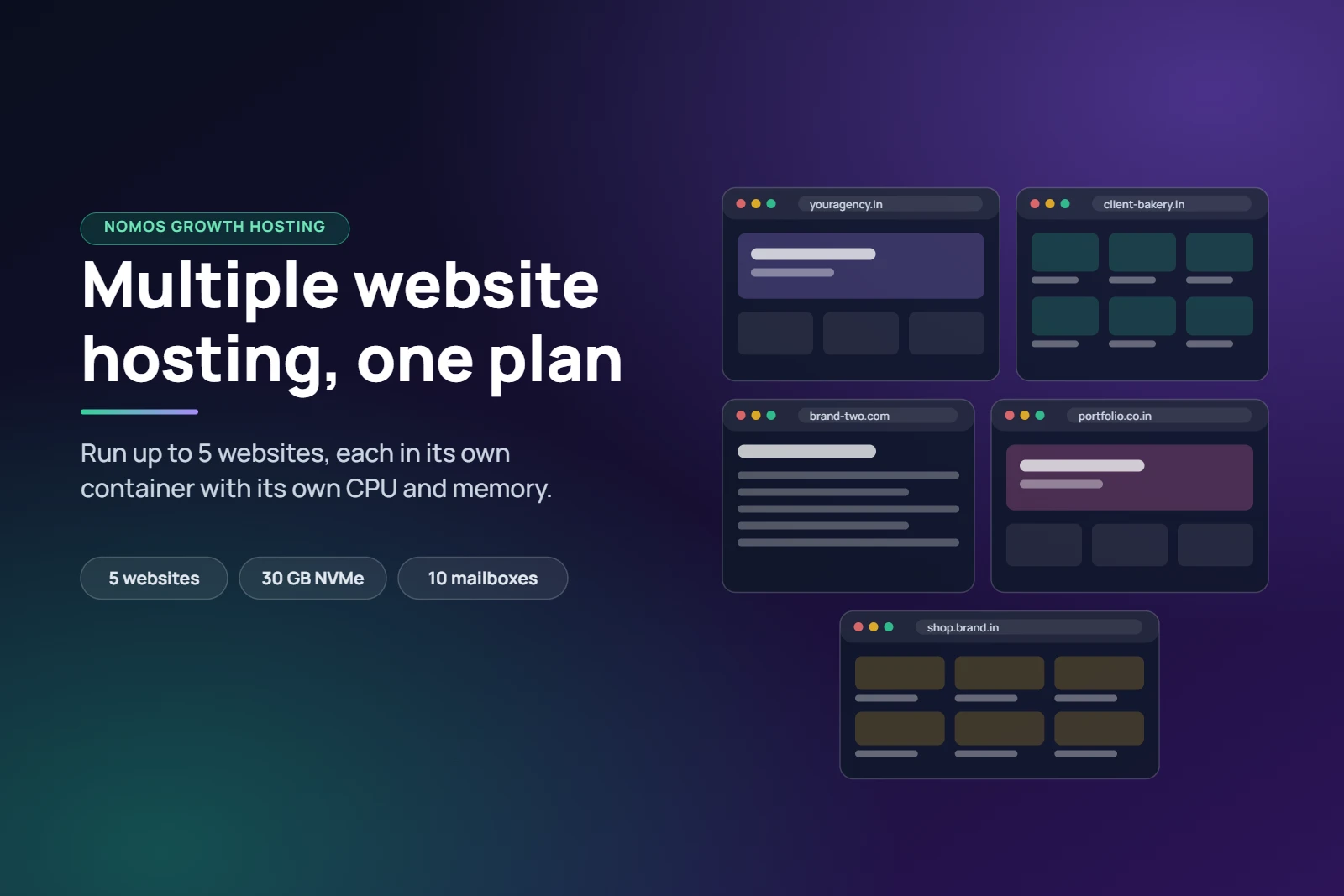
Multiple website hosting lets you run several websites from one hosting plan instead of buying, renewing and logging in to a separate plan for each one. If you look after an agency site, a few client sites or more than one brand, it can save you a lot of admin.
This guide explains how it works on Nomos. You’ll see what the Nomos Growth plan includes, what each website gets for itself, what the sites share, and when a different plan makes more sense.
What is multiple website hosting?
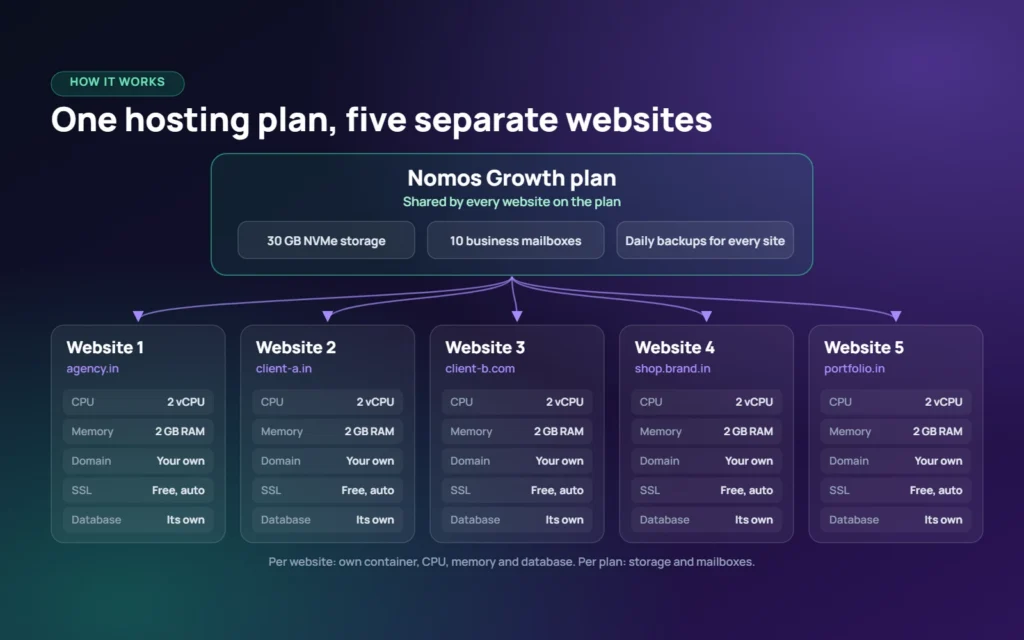
Multiple website hosting means one hosting plan holds more than one website. Each website can have its own domain, its own files and its own database. However, you pay for one plan and manage everything from one account.
The opposite is one plan per website. That works well when you only have one site. But once you have three or four, you end up tracking separate logins, separate renewal dates and separate invoices.
Not every multi-site plan works the same way, so check two things. First, how many websites the plan allows. Second, whether the sites share one pool of CPU and memory, or whether each site gets its own.
Who should host multiple websites on one plan?
Anyone who runs more than one small or medium website can benefit from multiple website hosting. Here are the most common cases.
Website hosting for agencies
A small web agency in Chennai might host its own site plus four client sites: a dental clinic, a restaurant, a coaching centre and a boutique. Every client gets their own domain and free SSL. Meanwhile, the agency manages all five from one control panel and pays one bill.
Freelancers
A freelance developer can keep a portfolio, a personal blog and two or three client projects together. For example, one site can run WordPress while another runs a plain PHP or HTML site. Each one still has its own database and its own PHP settings.
Small businesses
A business may need a main website, a separate online store and a landing page for a campaign. On Nomos Growth, WooCommerce is set up for India (₹ and GST), so the store can live on the same plan as the main site.
Businesses with several brands
A family business with a sweets shop, a catering service and a franchise enquiry site can give each brand its own domain and inbox, such as orders@ for one brand and hello@ for another. As a result, customers see three separate brands, while the owner manages one plan.
Multiple website hosting on Nomos Growth: up to 5 websites
Nomos Growth hosting supports up to 5 websites. That limit is fixed, so Growth is not an unlimited plan. If you need a sixth website, you’ll need another plan (see the limits section below).
Each of the five websites can be WordPress, an empty PHP or HTML website, or a Node.js app. You create them in the control panel under Websites → Create site, and a new site is usually ready in about a minute on a free temporary address.
How individual website containers work
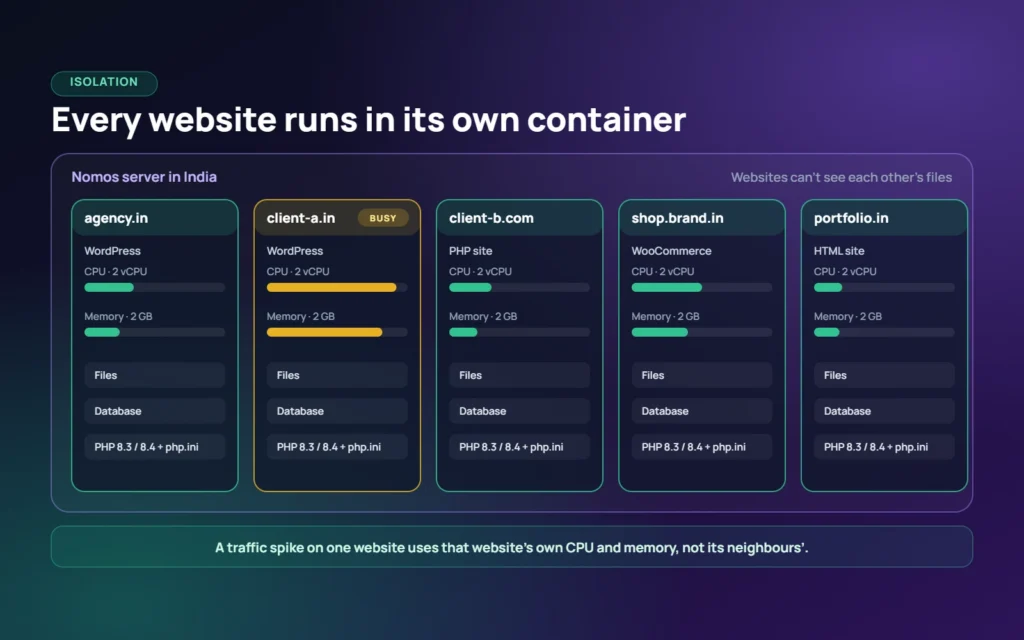
On Nomos, every website runs in its own isolated container. You can think of a container as a separate, locked room on the server. Each room has its own files, its own database and its own reserved CPU and memory.
This matters when you host multiple websites. Nomos enforces each website’s limits, so one busy site can’t slow down another. Also, websites can’t see each other’s files, so a problem on one client’s site stays on that site.
Each website also has its own PHP version (PHP 8.3 or PHP 8.4) and its own php.ini settings. So one older client site can stay on PHP 8.3 while a new site uses PHP 8.4. Our PHP settings guide shows where to change them.
Storage vs CPU and memory: what is shared?
This is the part of multiple website hosting that people most often get wrong, so here it is plainly. On Growth, some resources belong to the plan and some belong to each website.
| Resource | On Nomos Growth | Plan or per website? |
|---|---|---|
| Websites | Up to 5 | Plan |
| NVMe storage | 30 GB | Plan |
| Business email mailboxes | 10 | Plan |
| CPU | 2 vCPU | Each website |
| Memory (RAM) | 2 GB | Each website |
| Container, database and PHP settings | Its own | Each website |
In other words, CPU and memory are not shared between your sites. Each website gets 2 vCPU and 2 GB RAM for itself, and you can see live usage in your panel.
Storage works differently. The 30 GB of NVMe storage is the plan’s total, so plan for it. For instance, a large WooCommerce store with thousands of product photos will use more of it than a five-page brochure site.
How to connect a domain to each website
With multiple website hosting on Nomos, every website on the plan gets its own domain. You connect it from that website’s own Domains page. Here is the workflow:
- In the Nomos panel, open the website and go to Domains. Then add the domain, for example clientname.in.
- At the company where you bought the domain, add an A record for
@pointing to103.190.92.249. - Add a CNAME for
wwwpointing to your domain. If your provider doesn’t allow that, add an A record for www to the same IP instead. - Remove any other A or AAAA records for those names.
- Back in the panel, press Check DNS. Once it shows Active, the free SSL certificate is issued automatically and https:// works.
Repeat these steps for each website. DNS changes usually show up within minutes, but they can take up to 24 hours. For more detail, read how to connect your domain to your Nomos website.
Because SSL is free on every domain and renews itself, all five sites can run on HTTPS. That matters, because HTTPS protects your visitors even on simple sites.
How business email mailboxes work with the plan
Email is the one part of multiple website hosting that needs a little planning. Growth includes 10 business email mailboxes, and email works on a domain that is already connected to one of your websites. So connect the domain first.
- Open Emails in the panel and choose Enable email next to the domain.
- Add the MX, SPF, DKIM and DMARC records the page shows at your DNS provider. Each one turns green once it’s found.
- Create mailboxes such as hello@yourname.in.
- Read mail at webmail.nomos.wtf or in any mail app using IMAP and SMTP.
Since the 10 mailboxes come with the plan, decide early which brands or clients need inboxes. Our guide to business email on your own domain covers the DNS records in detail.
Backups and staging with multiple website hosting
On Growth, every website is backed up automatically every day, files and database together. You can restore or download recent backups whenever you need them.
You can also take a backup yourself before a big change. When you restore, Nomos takes a safety copy first, so you can undo the restore too. Read more in backups on Nomos.
Growth also includes staging for WordPress sites. You create a private staging copy, test a plugin update or redesign there, and then push it live when it’s right. This is useful for agencies, because a client’s live site stays untouched while you work. See how staging works.
Everything included in Nomos Growth hosting
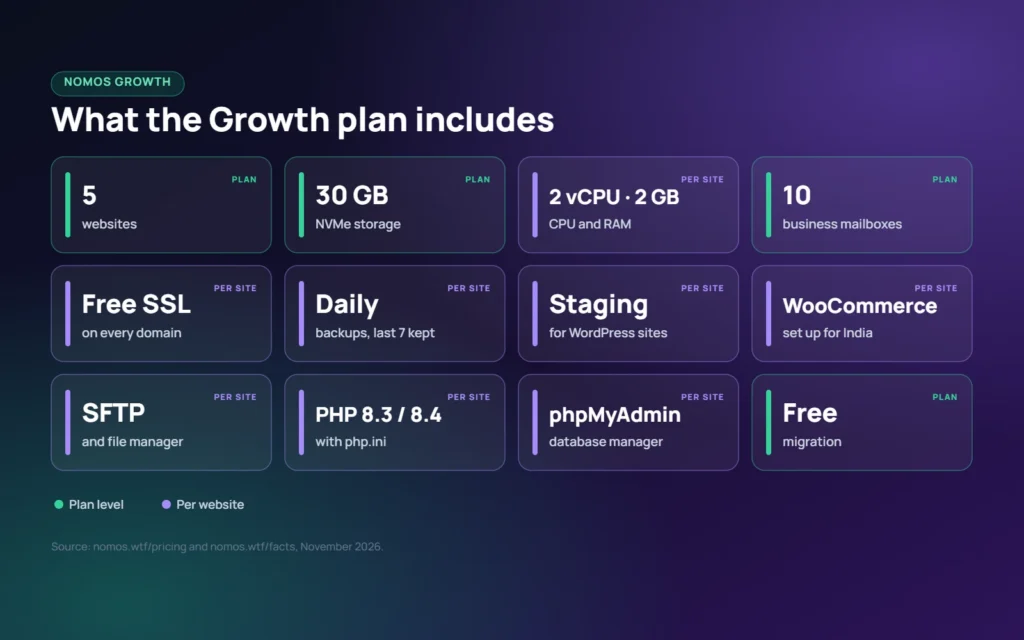
Besides the items above, every website gets the tools you need to manage it day to day:
- File manager and SFTP: edit files in the browser, or connect an app like FileZilla. Each website uses its own ID as the SFTP username.
- phpMyAdmin: manage each site’s MariaDB database.
- PHP 8.3 and 8.4: chosen per website, with your own php.ini settings.
- WooCommerce support: set up for India, with ₹ and GST.
- Free migration: on Growth, Nomos moves an existing site for you. Ask under Websites in the panel, or read how to move your website to Nomos.
Separate hosting plans vs multiple websites on one hosting plan
Here is a simple comparison. It doesn’t use any other company’s prices; it only compares the two ways of working.
| Separate plan for each site | One Nomos Growth plan | |
|---|---|---|
| Accounts and logins | Often one per plan or provider | One Nomos account |
| Renewals and invoices | One per plan, on different dates | One plan to renew |
| Isolation between sites | Separate by default | Each site still in its own container |
| CPU and memory | Set by each plan | 2 vCPU and 2 GB RAM for each site |
| Storage | Each plan has its own | 30 GB for the whole plan |
| Business email | Depends on each plan | 10 mailboxes on the plan |
| Backups | Depends on each plan | Daily for every site |
| Main risk | Easy to miss a renewal | All sites depend on one plan |
In short, multiple website hosting on one plan is easier to manage. Still, keep the plan’s payment up to date, because all five websites depend on it.
Multiple website hosting limits: when you need a different plan
Growth suits most small agencies and multi-brand businesses. However, it isn’t right for everyone.
- You need more than 5 websites. If they are all WordPress or WooCommerce sites, WP Business includes 10 websites and 80 GB of storage. Otherwise, consider a VPS.
- You need root access or custom server software. Choose a VPS instead. Nomos VPS plans are Linux servers with root access.
- Your files outgrow the plan. Growth has 30 GB of storage and a limit of 200k files and folders.
- You need Windows or ASP.NET. Nomos doesn’t offer Windows hosting.
- You only have one website. Micro or Starter costs less.
Not sure? Read which Nomos plan is right for your website, or compare every plan on the Nomos pricing page.
Frequently asked questions about multiple website hosting
How many websites can I host on Nomos Growth?
Up to 5. Each one runs in its own container with its own database and temporary address.
Do my websites share CPU and memory?
No. Each website gets its own 2 vCPU and 2 GB RAM. The 30 GB of NVMe storage and the 10 mailboxes belong to the plan.
Can each website have its own domain?
Yes. You add the domain on that website’s Domains page, point its DNS to Nomos and press Check DNS. Free SSL is then issued automatically.
Can I mix WordPress and non-WordPress sites?
Yes. On Growth, each website can be WordPress, an empty PHP or HTML site, or a Node.js app.
Are all five websites backed up?
Yes. On Growth, every website is backed up daily, and you can restore or download recent backups from the panel.
Does staging work for every site?
Staging copies are available for WordPress sites on Growth.
Can Nomos move my existing websites?
Yes. Free migration is included on Growth. Ask for it under Websites in your control panel, or email support@nomos.wtf.
Manage multiple websites with Nomos Growth
If you run between two and five websites, multiple website hosting on Growth keeps them together without making them share CPU or memory. You get daily backups, staging for WordPress, 10 mailboxes and free SSL on every domain, on servers in India. Plus, the plan renews at the same price.
Ready to bring your sites under one roof? Choose Nomos Growth hosting and ask us to move your existing sites for free.