
Search for “WordPress hosting India” and you’ll find dozens of hosts, ₹59 offers that triple at renewal, “unlimited” plans with limits in the small print, and support that replies after you’ve gone to bed. Picking the wrong one costs more than money: a slow site loses visitors, and a site without backups can lose everything in one bad update.
This guide makes the choice simple. You’ll learn what WordPress hosting in India actually is, the four types you’ll see, what “managed” really means, the eight things worth checking before you pay, and which plan fits a blog, a business website or an online store. There’s a checklist to use before you buy, answers to common questions and, at the end, a look at what we offer at Nomos.
The short version:
- For most business websites, blogs and small stores, managed WordPress hosting on servers in India gives the best balance of speed, safety and effort.
- Judge plans by the CPU and RAM each site gets, daily backups and a staging copy, not by “unlimited” claims.
- Compare the total cost for the whole term, including 18% GST and the renewal price, not the headline monthly price.
- Pick a host whose support works in Indian hours.
What is WordPress hosting?
WordPress itself is free software. To put a WordPress website on the internet, you need a server that runs it around the clock. WordPress hosting is a hosting plan set up for exactly that job: a server with PHP, a MySQL or MariaDB database and HTTPS, usually with WordPress installed for you.
WordPress runs roughly two in five of all websites, according to W3Techs, so almost every host sells some kind of WordPress plan. What separates them is how fast they are, how safe your data is and how much of the upkeep they do for you.
How WordPress hosting works
Every time someone opens your website, five things happen in about a second. Their browser asks the domain name system (DNS) where your domain lives. DNS points it to your host’s server. The server runs WordPress, which asks the database for your page’s content. The finished page then travels back to the visitor, encrypted over HTTPS.
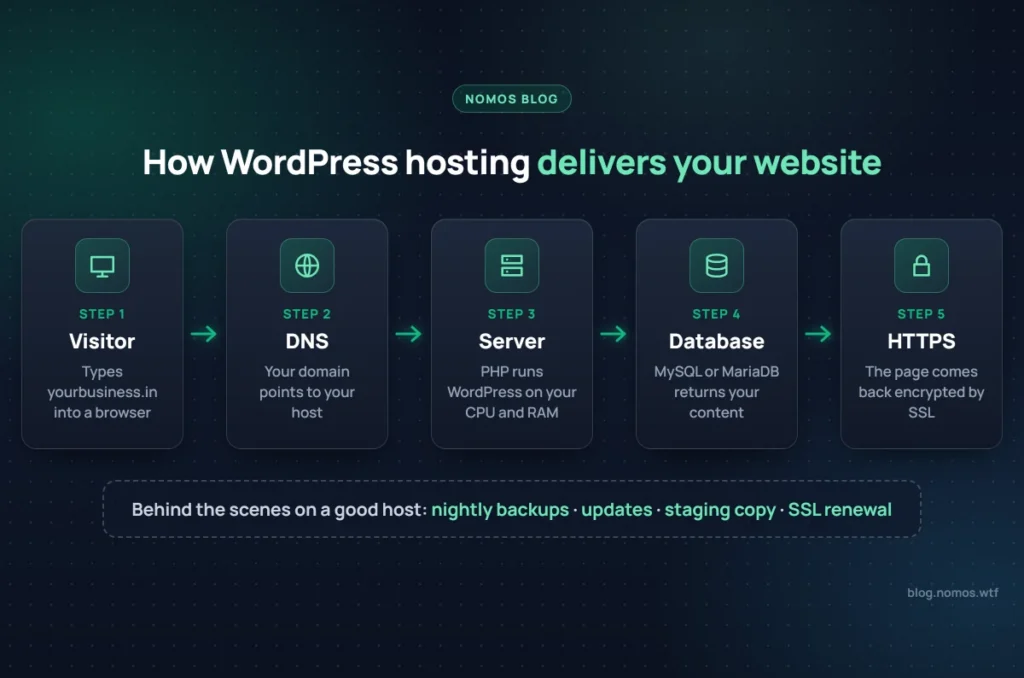
Each step is a place where good hosting saves time. Servers close to your visitors shorten the trip, enough CPU and memory keep WordPress quick, and a cache stops the database from answering the same question twice. WordPress.org currently recommends PHP 8.3 or newer, MySQL 8.4 or MariaDB 10.11 or newer, and HTTPS. A good host keeps that software current for you.
Types of WordPress hosting in India
You’ll see four kinds of hosting sold for WordPress. They differ in who looks after the server, how resources are shared and how much technical work lands on you.
| Type | Best for | Who does the upkeep | Watch out for |
|---|---|---|---|
| Shared hosting | First websites, small blogs, tight budgets | Host runs the server; you look after WordPress | Busy neighbours, vague “unlimited” limits |
| Managed WordPress hosting | Business sites, blogs, WooCommerce stores | Host handles setup, updates, backups and staging | Usually runs WordPress only |
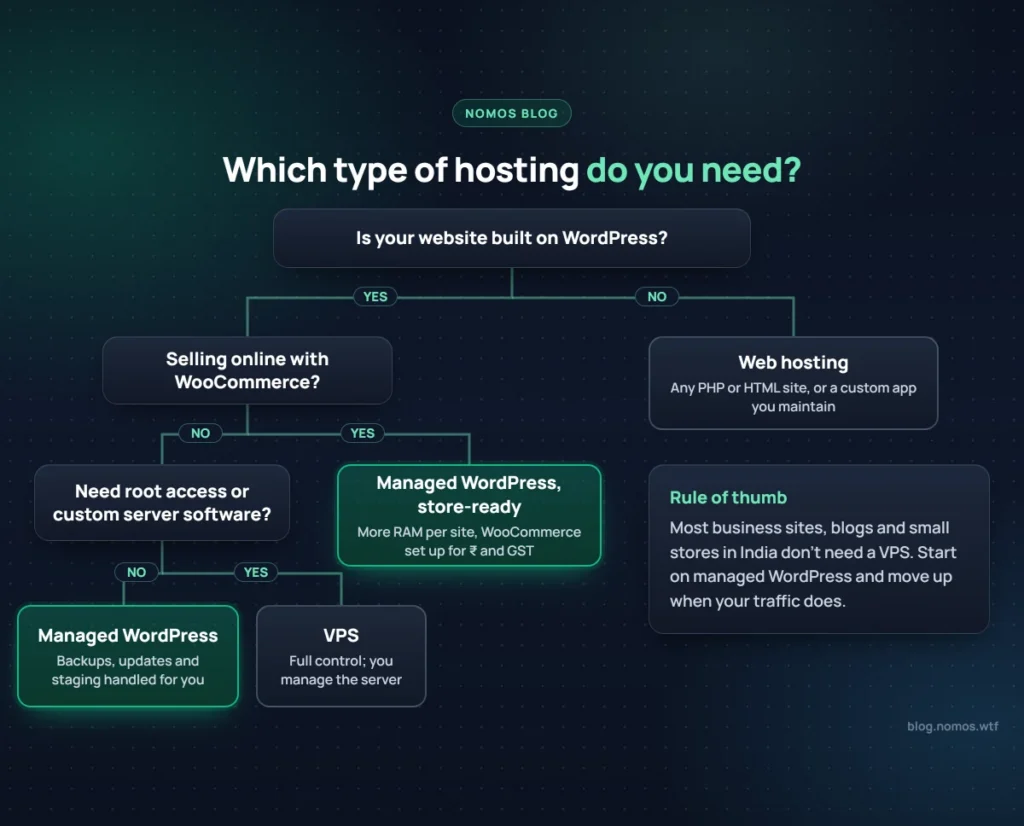
| VPS or cloud hosting | Developers, custom software, heavy traffic | You manage the server and its security | Needs real server skills |
| Dedicated server | Very large sites and apps | You or a team you hire | Highest cost; overkill for most |
Shared hosting
Many websites share one server’s resources. It’s the cheapest way online and works for a small site, but you look after WordPress yourself, and a traffic spike on another site can slow yours down unless the host reserves resources for each website.
Managed WordPress hosting
The host sets up WordPress, keeps it updated, backs it up and gives you tools such as a staging copy. You spend your time on content and customers, not maintenance. This is the right fit for most business owners, bloggers and small stores, and the type this guide focuses on.
VPS and cloud hosting
A virtual private server gives you your own slice of a machine with full root access. It’s powerful and flexible, but unless you pay extra for management, you install, secure and update everything yourself. If you’re weighing one up, our guide to VPS hosting in India explains when it’s worth it.
Dedicated servers
A whole physical server for one customer. It makes sense for very large websites or applications with their own engineering team, and rarely for a typical Indian business website.
Not sure where you fit? Answer three questions:
Managed vs regular WordPress hosting: what’s the difference?
Both run WordPress. The difference is who does the upkeep. On regular hosting, the host keeps the server running and the rest is up to you. On managed WordPress hosting, the routine work of installing, updating, backing up and testing is done for you.
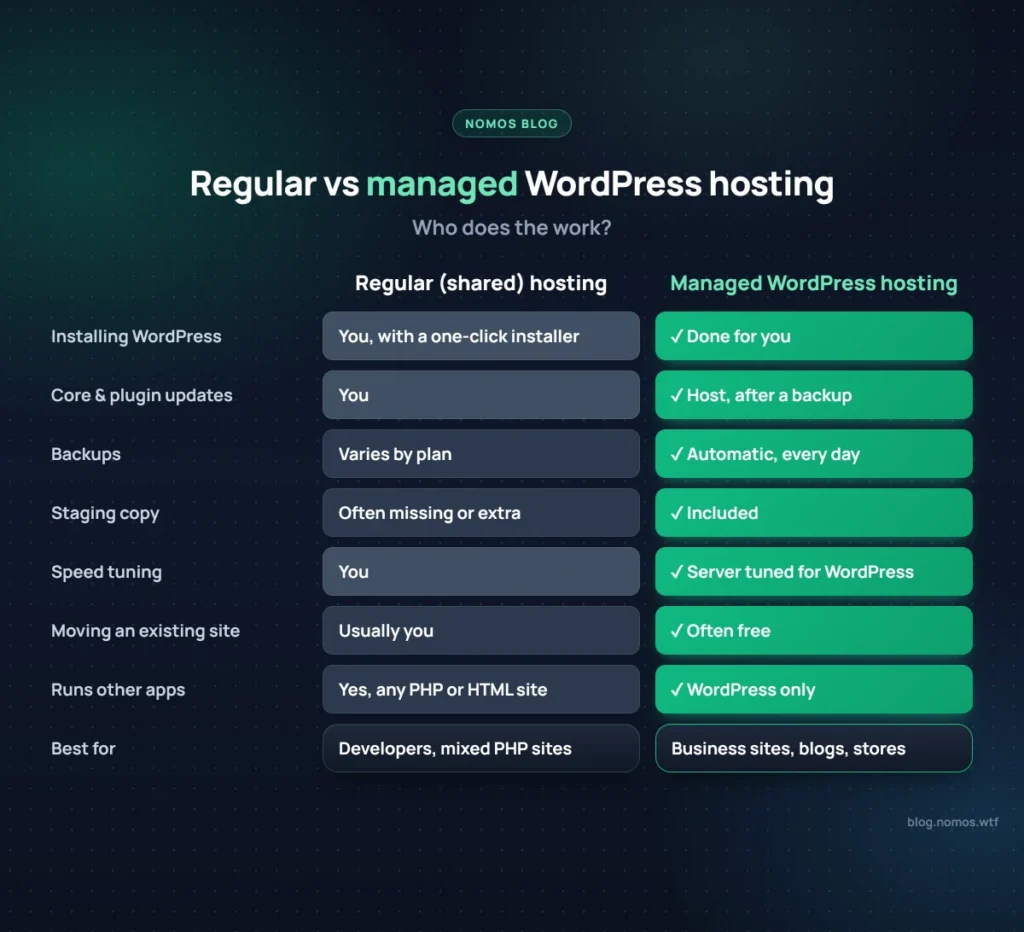
Here’s where it matters. Say a plugin update breaks your contact form the night before a festive sale. On regular hosting, you need a recent backup you remembered to take, and the time to restore it. On managed hosting, you restore last night’s automatic backup in one click, or you’d have tried the update on your staging copy first and never broken the live site at all.
When regular hosting is enough
- You’re comfortable updating WordPress, plugins and themes yourself.
- You want to run other PHP apps or HTML sites alongside WordPress.
- The site is a hobby project where a few hours of downtime wouldn’t hurt.
When managed WordPress hosting is worth it
- The website brings you enquiries, bookings or sales.
- You don’t have a developer on call, or you’d rather not be one.
- You run WooCommerce, where a broken update means lost orders.
- You manage several client sites and need backups and staging on each.
How to choose the best WordPress hosting in India: 8 things to check
Price matters, but it shouldn’t be the first thing you compare. These eight checks tell you far more about how a host will treat your website.
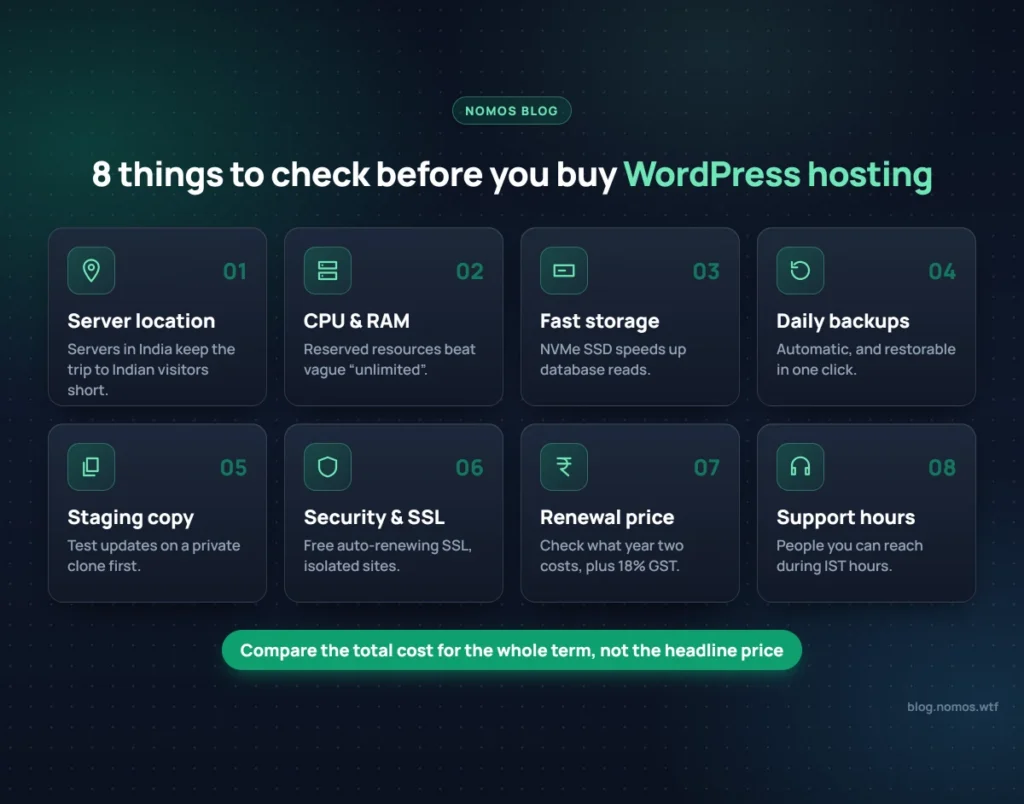
1. Server location
If most of your visitors are in India, choose servers in India. Every page request has to travel to the server and back, and a shorter trip means a faster site, which helps both visitors and search rankings. If your audience is spread worldwide, a content delivery network (CDN) can help on top.
2. CPU and RAM for each site
“Unlimited storage and bandwidth” sounds generous, but what really limits WordPress is processing power and memory. Look for plans that state the CPU and RAM reserved for each website. Online stores, membership sites and heavy page builders need more memory than a simple blog.
3. Fast NVMe storage
WordPress reads from its database constantly. NVMe SSD storage handles those reads much faster than older SSDs or hard drives, so pages and the admin dashboard feel quicker.
4. Daily backups you can restore yourself
Ask four questions: how often are backups taken, how many are kept, can you restore one yourself in a click, and can you download a copy? Backups that cost extra, or that only the support team can restore, are a warning sign.
5. A staging copy
A staging copy is a private clone of your website where you can try a new theme, plugin or update before your visitors see it. Once it works, you push the changes live. It turns risky updates into safe ones.
6. Security: SSL, isolation and updates
Every site needs HTTPS. Free SSL that renews itself should be standard, not a paid add-on. Also check that websites are isolated from each other, that malware scanning is included and that the server runs a current PHP version.
7. The real price: renewal and GST
Many headline prices apply only to a long term paid upfront, and the plan then renews at a much higher rate. Indian hosting prices are also usually shown before 18% GST. Work out the total for the whole term. For example, a plan at ₹99 a month for the first year that renews at ₹299 costs about ₹9,870 over three years with GST, while a plan at a steady ₹199 a month costs about ₹8,450. The “cheaper” plan ends up costing more.
8. Support you can reach
When something breaks, you want a person who answers during your working day. Check support hours in IST, the channels offered and whether real people reply. Sending a pre-sales question is a quick way to test a host before you pay.
Two more worth asking about: free migration if you already have a website, and an easy upgrade path so you can move to a bigger plan without rebuilding anything.
WordPress hosting for beginners: which plan do you actually need?
Most people buy more hosting than they need, or far less. Here’s how it usually works out.
A personal blog or portfolio
One website with modest traffic. A single-site managed WordPress plan is enough. Spend the savings on a good domain name. Our guide to choosing between .in, .co.in and .com helps with that.
A local business website
Think of a dental clinic in Chennai or a café in Pune: a few pages, a contact form, a map and a WhatsApp button. A single-site managed plan handles this easily. What matters more is a professional business email on your own domain and daily backups, so the site is never down when customers look you up.
An online store with WooCommerce
Stores need more memory for the cart and checkout, Indian payment options such as UPI, and a plan that explicitly supports WooCommerce. Our step-by-step guide to building a WooCommerce store in India covers the full setup.
An agency or freelancer with client sites
Look for a plan that runs several WordPress sites, each isolated, each with its own backups and staging copy. That way one client’s plugin problem never touches another client’s site.
Red flags when buying affordable WordPress hosting
Affordable WordPress hosting is easy to find. Affordable hosting that stays affordable and reliable takes a closer look. Walk away, or ask hard questions, if you see:
- A headline price that only applies to a four-year term paid upfront, with a much higher renewal price.
- “Unlimited” everything, with no CPU or RAM figures anywhere on the plan.
- Backups that cost extra, run only weekly or can only be restored by support.
- SSL sold as a paid add-on.
- No clear refund policy or a hard-to-find cancellation process.
- Support only by ticket, in a time zone far from yours.
Your WordPress hosting checklist
Before you pay for any of the WordPress hosting plans you’re comparing, tick these off:
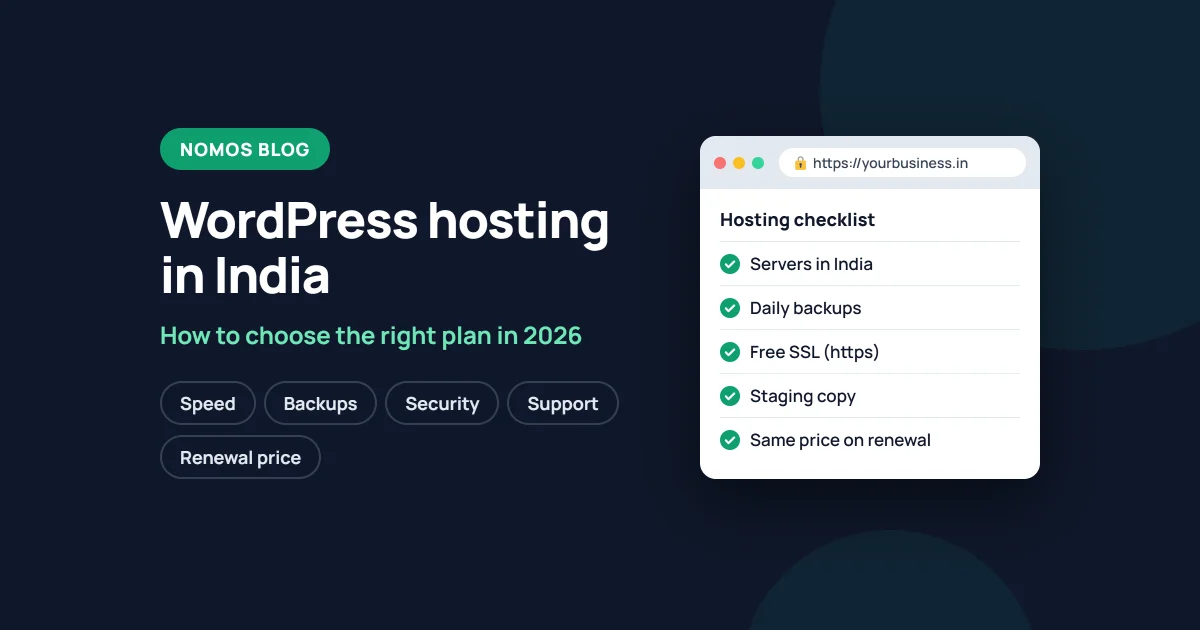
- ✅ Servers in India, or a CDN if your audience is global
- ✅ CPU and RAM per site stated on the plan
- ✅ NVMe SSD storage
- ✅ Daily automatic backups with one-click restore
- ✅ A staging copy included
- ✅ Free SSL that renews itself
- ✅ WordPress and plugin updates handled for you
- ✅ Renewal price and GST checked for the full term
- ✅ Free migration if you already have a website
- ✅ Support hours that match your working day
- ✅ A simple way to upgrade as you grow
WordPress hosting plans on Nomos
Nomos is the company behind this blog, so read this section for what it is: a description of our own product. We built our managed WordPress hosting around the checklist above, on servers in India.
| Plan | 36-month term | 12-month term | Monthly |
|---|---|---|---|
| WP Starter | ₹149 | ₹199 | ₹299 |
| WP Growth | ₹249 | ₹349 | ₹499 |
| WP Business | ₹499 | ₹699 | ₹999 |
Prices are per month and don’t include tax. 36-month and 12-month terms are paid upfront, and every term renews at the price you bought it at.
| Plan | Websites | NVMe storage | CPU and RAM per site | WooCommerce |
|---|---|---|---|---|
| WP Starter | 1 | 20 GB | 1 vCPU · 1 GB | No |
| WP Growth | 3 | 40 GB | 2 vCPU · 2 GB | Yes |
| WP Business | 10 | 80 GB | 2 vCPU · 3 GB | Yes |
Every WordPress plan includes:
- WordPress installed in about a minute, with SSL and your admin account ready
- CPU and memory reserved for each website, so a busy neighbour can’t slow you down
- A backup every night, with one-click restore that takes a safety copy first
- Minor WordPress releases and plugin updates applied after each nightly backup
- A staging copy to test changes, then push them live
- A private Redis object cache you can switch on
- Free migration from your old host
- Invoices with your GSTIN, and support in IST, Monday to Saturday, 10:00 to 19:00
On WP Growth and WP Business, you can create a WooCommerce store that comes set up for India, with rupee prices and GST. Still deciding? Our guide to choosing the right Nomos plan walks through it, and if your website isn’t built on WordPress, see web hosting in India instead.
How to get started
- Choose your domain. If you don’t have one yet, see how to buy a domain name in India.
- Pick a plan using the checklist above.
- Create your WordPress site. On managed hosting, it’s installed for you.
- Connect your domain and check that the padlock appears. Here’s how to connect your domain to Nomos.
- Take a backup before launch, then go live. Learn how backups on Nomos work.
Already have a WordPress site elsewhere? We’ll move your website to Nomos for free on every WordPress plan.
Frequently asked questions
What is the best WordPress hosting in India?
There’s no single best host for everyone. The best WordPress hosting in India for you has servers in India, states the CPU and RAM each site gets, takes daily backups you can restore yourself, includes staging and free SSL, renews at a fair price and offers support during Indian hours. Use the checklist above to compare any shortlist.
How much does WordPress hosting cost in India?
It depends on the type of hosting and the term you choose. Shared plans are the cheapest, VPS and dedicated servers cost the most, and managed WordPress sits in between. On Nomos, managed WordPress hosting starts at ₹149 a month on a 36-month term, or ₹299 month to month, plus GST. Whichever host you pick, compare the total for the full term and the renewal price.
Is managed WordPress hosting good for beginners?
Yes. WordPress hosting for beginners should remove the technical chores, and managed hosting does exactly that: WordPress is installed for you, updates and backups happen automatically, and a staging copy lets you experiment without breaking your live site.
Does server location matter if my visitors are in India?
Yes. Data has to travel between your server and each visitor. Servers in India shorten that distance, which makes pages load faster for Indian visitors.
What’s the difference between WordPress.com and WordPress hosting?
WordPress.com is a hosted service run by one company, with features that depend on the plan you buy. WordPress hosting runs the free WordPress software from WordPress.org on a server you rent, giving you full admin access and the freedom to install any theme or plugin.
Can I move my existing WordPress site to a new host?
Yes. Your files and database are copied to the new server and checked, then your domain is pointed at the new host. Many managed hosts, including Nomos, do this for you for free.
Can I run WooCommerce on any WordPress hosting plan?
WooCommerce runs on most WordPress hosting, but stores need more memory than a simple website. Choose a plan that explicitly supports WooCommerce. On Nomos, that’s WP Growth or WP Business.
The bottom line
The right WordPress hosting in India is fast for Indian visitors, keeps your site backed up and up to date, and costs what it said it would when the plan renews. Use the eight checks and the checklist in this guide to compare any host you’re considering. If you’d like that taken care of for you, see our managed WordPress hosting plans, or email support@nomos.wtf with any question before you buy.
Related guides