
Search for “VPS hosting India” and every result promises speed, power and full control for a few hundred rupees a month. What the ads rarely say is that a VPS is a different kind of product from website hosting: you get your own server, and with it, the job of running it. Choose well and you have a fast, flexible home for your app. Choose badly and you pay for resources you can’t use, or a server you don’t have time to look after.
This guide explains VPS hosting in plain language: what a VPS is, how it works, how it compares with shared web hosting, and the seven things worth checking before you pick a VPS server in India. You’ll also find use cases, a sizing guide, a checklist and, at the end, an honest look at what Nomos VPS hosting does and doesn’t include.
The short version:
- A VPS is your own virtual Linux server with root access, reserved resources and its own IP address.
- It’s the right choice for apps, APIs, bots, databases and containers. For websites alone, web hosting or WordPress hosting is simpler and cheaper.
- Most affordable VPS plans are unmanaged: you handle updates, security and backups yourself.
- Check vCPU, RAM, NVMe storage, bandwidth, IP address, server location and support before you pay.
What is VPS hosting?
VPS stands for virtual private server. Think of a large apartment building. Shared hosting is like a hostel dormitory: cheap and convenient, but you share everything. A dedicated server is the whole building. A VPS is your own flat: you share the building’s structure, but the space inside is yours, locked, and you can arrange it however you like.
In technical terms, a VPS is a slice of a powerful physical server that behaves like a complete computer of its own. It has its own operating system, its own share of processor, memory and storage, its own IP address and full administrator (root) access. You connect to it over SSH and install whatever your project needs.
How a VPS works
A piece of software called a hypervisor splits one physical server into several virtual machines. Each one gets a fixed share of the hardware and is kept separate from the others, so another customer can’t see your files or log in to your server. When a request arrives from the internet, it goes straight to your VPS’s IP address, where your software answers it.
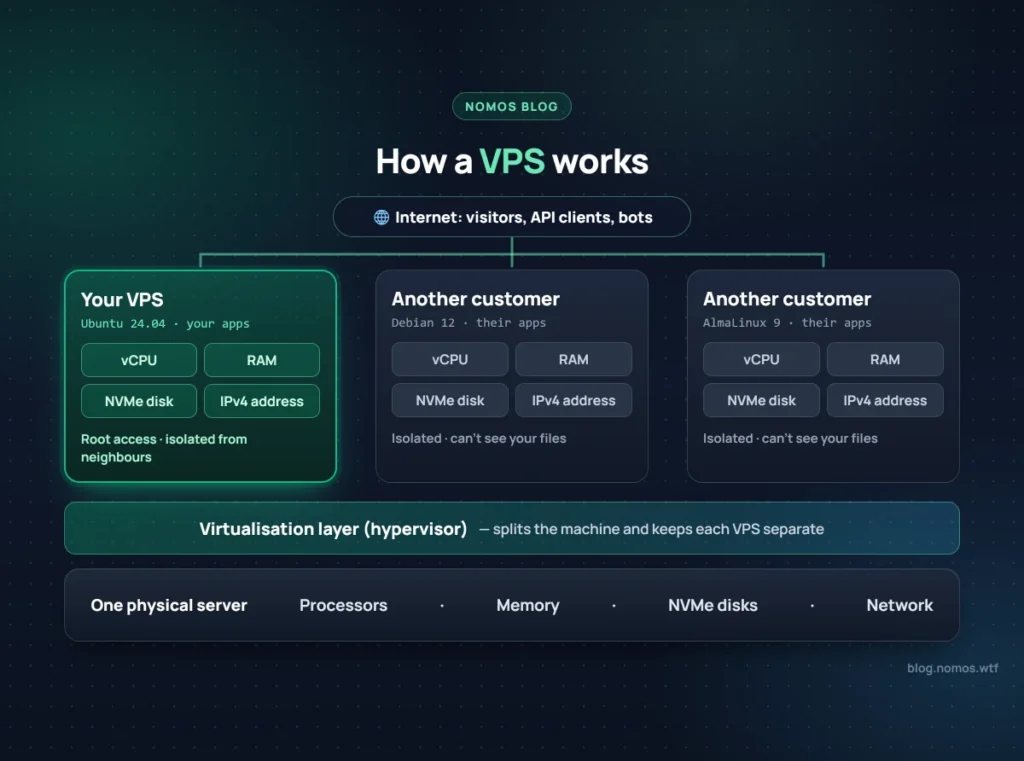
Because each VPS runs its own operating system, you can choose the Linux distribution you like, such as Ubuntu, Debian or AlmaLinux, and configure it exactly as your application needs. That flexibility is why Linux VPS hosting is the standard home for custom applications.
VPS hosting vs shared web hosting
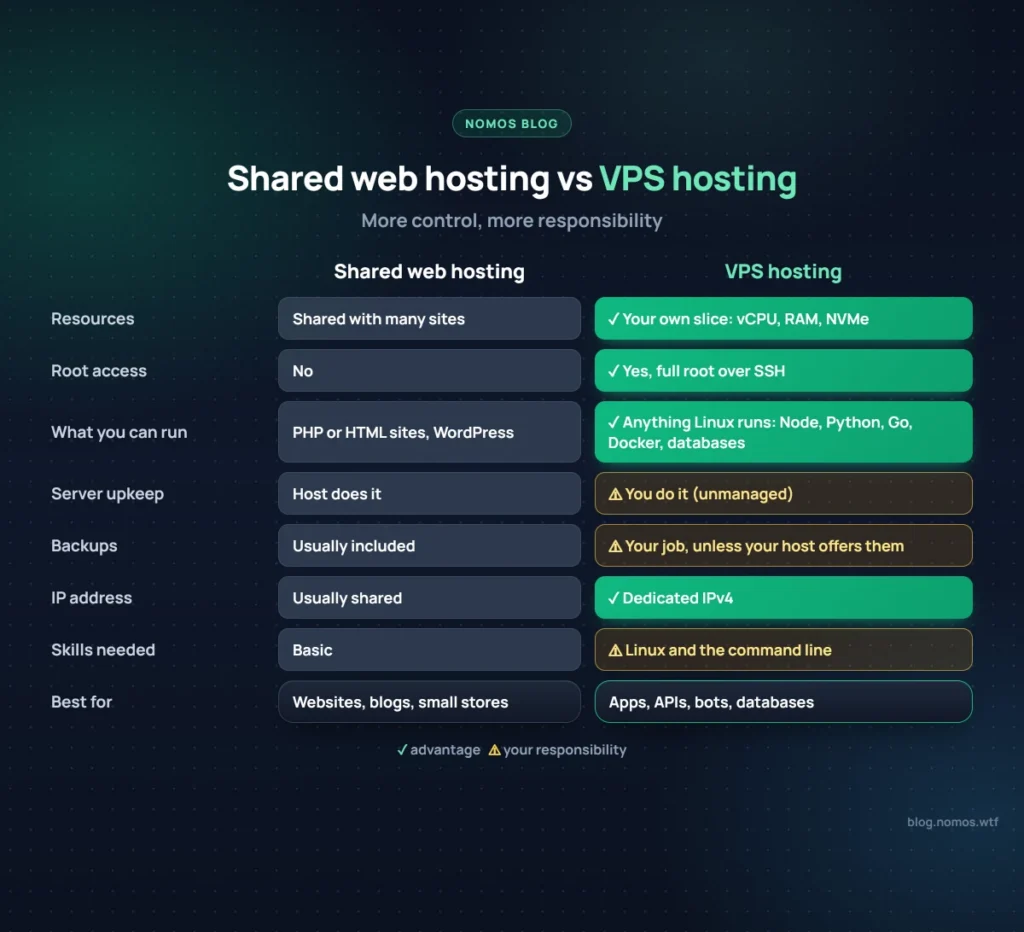
Shared web hosting puts many websites on one server and manages it for you. It’s ideal when all you need is a website. A VPS gives you a server of your own, which means more freedom and more responsibility.
| Shared web hosting | VPS hosting | |
|---|---|---|
| What you get | Space on a managed server | Your own virtual Linux server |
| Root access | No | Yes, over SSH |
| What you can run | PHP or HTML websites, WordPress | Almost anything Linux runs |
| Who maintains the software | The host | You, on an unmanaged VPS |
| Backups | Usually included | Your job, unless your host offers them |
| IP address | Usually shared | Dedicated |
| Skills needed | Basic | Comfortable with Linux and the command line |
| Best for | Business websites, blogs, small stores | Apps, APIs, bots, databases, containers |
An honest rule: if your project is a website, start with web hosting or managed WordPress hosting. Move to a VPS when you need to run software those plans can’t.
Unmanaged VPS and root access: what you’re signing up for
Root access means you’re the administrator of the server. You can install any package, open any port, run background services and change any setting. It also means nobody else is looking after the operating system for you.
Most affordable VPS plans in India are unmanaged. The provider keeps the hardware and network running and helps with things like reboots or reinstalls. Everything inside the server is yours to manage:
- Security updates for the operating system and your software
- Firewall rules and SSH settings, ideally with key-based logins
- Backups of your databases and files, stored somewhere other than the server
- Monitoring, so you know when a service stops or the disk fills up
- Web server and SSL setup if you serve a website or API
If those tasks sound routine, a VPS will feel like freedom. If they sound like a second job, a managed service will serve you better.
7 things to know before choosing a VPS server in India
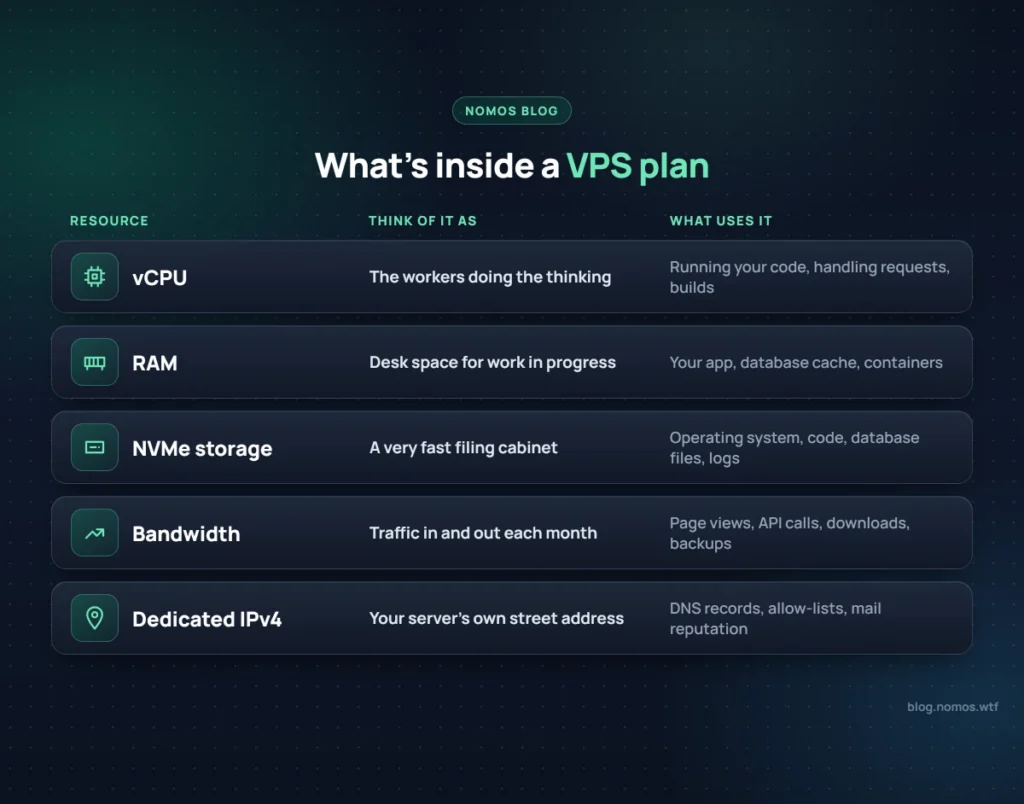
Every VPS plan lists the same handful of numbers. Here’s what each one means for your project, plus the questions that don’t appear in the spec sheet.
1. vCPU: how much processing power you get
A vCPU is a virtual processor core. More vCPUs let your server do more work at the same time, such as handling many API requests, running builds or processing images. A bot, a small API or a learning project runs comfortably on one vCPU. Production apps with steady traffic, background workers or several containers benefit from two or more.
2. RAM: the most common bottleneck
Memory holds everything your server is working on right now: your application, the database’s cache and every running container. When RAM runs out, the server slows to a crawl or kills processes. Databases and Docker in particular like memory, so if you’re unsure, buy more RAM before you buy more CPU.
3. NVMe storage: speed as well as space
Storage holds the operating system, your code, database files, uploads and logs. NVMe SSDs are much faster than older SSDs or hard drives, which shows up as quicker database queries, faster builds and snappier package installs. Check the size too: logs and Docker images grow faster than you expect.
4. Bandwidth and data transfer
Bandwidth, often listed as monthly data transfer, is how much data can travel in and out of your server each month. Page views, API responses, file downloads and off-server backups all count. Most small apps use a fraction of a terabyte, but check what happens if you go over: some providers charge extra, others slow your connection.
5. A dedicated IP address
A dedicated IPv4 address is your server’s own public address on the internet. You point your domain’s DNS records at it, add it to partners’ allow-lists, and use it for SSL and webhooks. If you plan to send email from the server, you’ll also need reverse DNS set up for that address, which your provider has to configure.
6. Server location: why servers in India matter
Every request travels from your user to the server and back. If your users are in India, a VPS server in India keeps that trip short, which means faster API responses and pages, especially on mobile networks. Some Indian businesses also prefer to keep their data in the country for customer trust or their own compliance needs. If that applies to you, check the provider’s data centre location and ask your adviser what you need.
7. Management, backups, support and billing
Before you pay, find out exactly what the provider does and doesn’t do. Is the VPS managed or unmanaged? Are backups or snapshots included, or do you need your own? Can you reach a person during Indian working hours? Is billing monthly, or are you locked into a long term? Do you get a GST invoice? These answers matter more than a small difference in price.
Who needs a VPS?
VPS hosting for developers
Developers use a VPS to deploy apps in Node.js, Python, Go, PHP or Java, run Docker containers, test ideas and host side projects with full control over the stack. It’s also a cheap way to learn Linux administration properly.
Startups
A VPS is a cost-effective home for an early product: your API, a database and a background worker on one server, with a predictable monthly bill. When you grow, you can add servers or move parts to bigger machines.
Agencies
Agencies use a VPS to host client apps, staging environments, internal tools and automation workflows that don’t fit on standard web hosting.
Businesses
Businesses use a VPS for custom software, internal dashboards, integrations with accounting or CRM systems, and services that need a fixed IP address for a partner’s allow-list.
Practical use cases for a VPS
- Web applications built with frameworks such as Next.js, Django, Laravel or Rails
- APIs and backends for mobile apps and websites
- Bots for Telegram, Discord or Slack, and webhook receivers for payments or WhatsApp Business messages
- Databases such as PostgreSQL, MySQL or Redis for your own apps
- Docker containers running several services side by side
- Automation and self-hosted tools, such as workflow automation, a Git server or uptime monitoring
- Staging servers and build runners for testing before you deploy
A rough starting point for sizing, before you measure your own usage:
| Project | Good starting size |
|---|---|
| A bot, a side project or learning Linux | 1 vCPU, 2 GB RAM |
| A small app with its own database | 1 vCPU, 4 GB RAM |
| A production API or several containers | 2 vCPU, 8 GB RAM |
Start small, watch your memory and CPU use for a couple of weeks, then resize if you need to. With monthly billing, that’s a low-risk way to find the right plan.
Cheap VPS hosting in India: what to watch for
Cheap VPS hosting in India can be excellent value, as long as the low price isn’t hiding a catch. Look carefully if you see:
- A headline price that only applies to a long term paid upfront, with a much higher renewal price.
- No clear figures for vCPU, RAM, storage type or monthly transfer.
- “Unlimited” bandwidth with a fair-use policy that throttles busy servers.
- No dedicated IPv4 address, or an extra charge for one.
- No clear statement on whether backups are included.
- Support only by ticket, in a time zone far from yours, or no GST invoice for your business.
Your VPS checklist
Before you buy any VPS server in India, tick these off:
- ✅ You need software that web or WordPress hosting can’t run
- ✅ vCPU and RAM match your app, with room to spare
- ✅ NVMe storage, sized for your data, logs and images
- ✅ Monthly transfer that covers your traffic
- ✅ A dedicated IPv4 address included
- ✅ Servers in India if your users are in India
- ✅ You know whether it’s managed or unmanaged
- ✅ You have a plan for backups if they aren’t included
- ✅ Support you can reach in Indian working hours
- ✅ Monthly billing, or a term you’re comfortable with, and a GST invoice
VPS hosting on Nomos
Nomos is the company behind this blog, so read this section for what it is: a description of our own product. Nomos VPS hosting gives you an unmanaged Linux server on servers in India, month to month with no lock-in or on 12 or 24 months paid upfront, and every term renews at the same price.
| Plan | vCPU | RAM | NVMe storage | Transfer | 24 months | 12 months | Monthly |
|---|---|---|---|---|---|---|---|
| VPS 1 | 1 | 4 GB | 50 GB | 4 TB | ₹479 | ₹599 | ₹799 |
| VPS 2 | 2 | 8 GB | 100 GB | 8 TB | ₹619 | ₹799 | ₹1,039 |
| VPS 4 | 4 | 16 GB | 200 GB | 16 TB | ₹879 | ₹1,083 | ₹1,999 |
| VPS 8 | 8 | 32 GB | 400 GB | 32 TB | ₹1,759 | ₹2,169 | ₹3,999 |
Prices are per month and don’t include tax. The 24- and 12-month terms are paid upfront; month to month you can cancel whenever you like.
Every Nomos VPS includes:
- Full root access over SSH
- Ubuntu 24.04, Debian 12 or AlmaLinux 9
- NVMe storage and one dedicated IPv4 address
- Reboots, reinstalls and reverse DNS handled by our team when you ask from your dashboard
- Setup by our team after payment, usually within a few hours during support hours, with an email when it’s ready
- Invoices with your GSTIN, and support in IST, Monday to Saturday, 10:00 to 19:00
What it doesn’t include: Nomos VPS is not managed. You run the software yourself, including updates, firewall rules and backups of your data. Backups aren’t included, so keep copies of anything important somewhere else. If you only need websites, web hosting or WordPress hosting is cheaper, and we look after SSL, backups and email for you there.
You can also see every Nomos plan side by side on the Nomos pricing page.
Getting started with a new VPS
- Pick a plan that fits your project, using the sizing guide above.
- Choose your operating system. Ubuntu is the most common choice if you’re unsure.
- Log in over SSH, create a regular user with sudo rights and switch to SSH keys instead of passwords.
- Turn on a firewall and install updates, opening only the ports your app needs.
- Set up backups of your databases and files to storage outside the server.
- Deploy your app, point your domain’s DNS at the server’s IP address and add SSL.
Frequently asked questions
What is VPS hosting in India?
It’s a virtual private server hosted in an Indian data centre: your own Linux server with reserved resources, root access and a dedicated IP address, close to users in India.
Is cheap VPS hosting good enough?
It can be, for bots, side projects and small apps. Check that the plan states its vCPU, RAM, NVMe storage and transfer clearly, includes a dedicated IPv4 address and renews at a fair price. The cheapest plan isn’t good value if it runs out of memory.
Do I need a VPS for a WordPress website?
Usually not. Managed WordPress hosting runs WordPress well and handles updates, backups and SSL for you. A VPS makes sense only if you want to manage the server yourself or run other software alongside WordPress.
What’s the difference between Linux VPS hosting and Windows VPS hosting?
A Linux VPS runs a Linux distribution such as Ubuntu or Debian and suits most web apps, APIs, databases and containers. A Windows VPS runs Windows Server for software that needs it, and usually costs more because of licensing. Nomos VPS plans run Linux: Ubuntu 24.04, Debian 12 or AlmaLinux 9.
Is a VPS secure?
Each VPS is isolated from the others on the same machine, which is a good foundation. On an unmanaged VPS, the rest is up to you: keep the system updated, use SSH keys, run a firewall and keep backups off the server.
Are backups included with a Nomos VPS?
No, not at the moment. Keep copies of anything important somewhere else. Automated server backups are on our list.
How long does it take to get a Nomos VPS?
Our team sets up each server by hand after payment, usually within a few hours during support hours (Monday to Saturday, 10:00 to 19:00 IST), and emails you when it’s ready.
The bottom line
VPS hosting in India is a great fit when you need your own server: for apps, APIs, bots, databases and containers, with full control and servers close to your users. Compare plans on vCPU, RAM, NVMe storage, transfer, IP address, location and support, and be honest with yourself about the upkeep an unmanaged server needs. If you’re ready for that, see our VPS plans, or email support@nomos.wtf with your project and we’ll help you pick a size.
Related guides