
Think about the customers who already like your business: the regular who buys from your shop every festival, the client who referred a friend, the person who filled in your contact form last month. Email marketing for small businesses in India is simply a way to stay in touch with those people, on a channel you own, for very little money.
If you’ve never sent a newsletter before, this guide walks you through it in five steps. You don’t need a designer, a big list or a marketing team. You need permission, something useful to say and a simple tool.
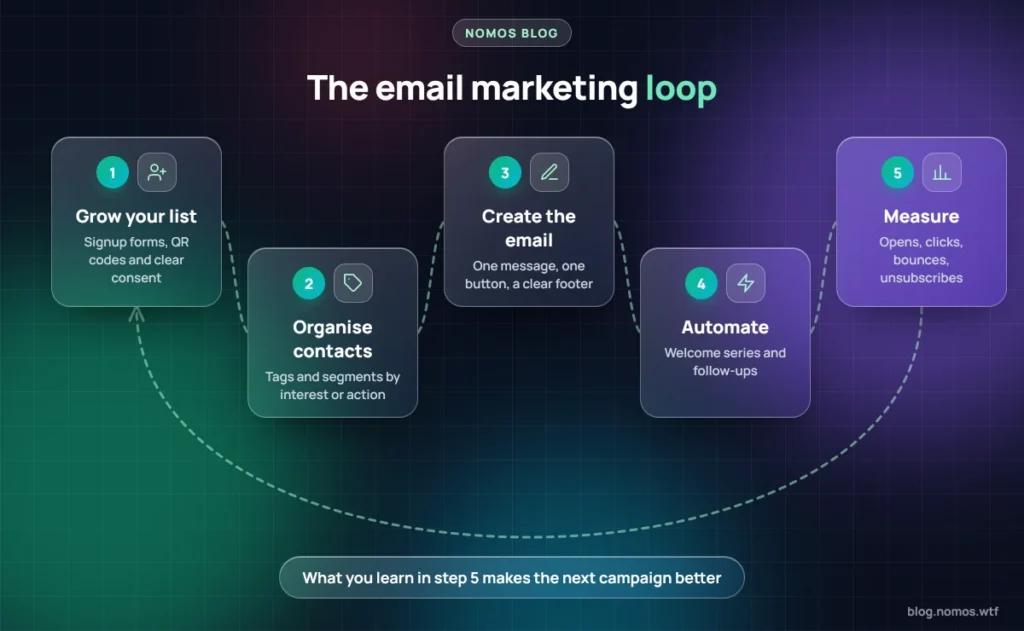
Your first newsletter in five steps
- Grow your list with people who ask to hear from you.
- Organise your contacts with tags, so each email reaches the right people.
- Create the email: one message, one button and an unsubscribe link.
- Automate a welcome email so new subscribers hear from you straight away.
- Measure clicks, bounces and unsubscribes, then improve the next one.
Email marketing, explained simply
Email marketing means sending planned, useful emails to people who agreed to receive them. Those emails can share news, offers, advice or reminders, and they bring readers back to your shop, website or booking page.
What is an email newsletter?
A newsletter is a regular email to your list, sent weekly, fortnightly or monthly. For example, a boutique might share its new collection, a café might list this week’s specials, and an agency might send three practical tips. The format is flexible; what matters is that readers find it worth opening.
Why do businesses send newsletters?
- Bringing past customers back for another purchase or visit
- Announcing launches, offers, events and changes to opening hours
- Building trust by being helpful, not just promotional
- Staying on a customer’s mind between purchases
Why email marketing for small businesses in India works
Small business email marketing has a few advantages that are hard to find elsewhere.
- You own the list. A platform can change how many people see your posts. Your subscribers stay yours.
- It costs little. Many tools include a free or bundled plan, so your time is the main investment.
- It’s personal. You can greet people by name and send different emails to different groups.
- You can measure it. Every campaign tells you what worked.
It also fits the rhythm of Indian business: festivals, seasonal launches and local events give you natural reasons to write.
Step 1: Build your email list the right way
Your list is the foundation of everything else, so build it carefully. Fifty people who chose to hear from you are worth more than five thousand who didn’t.
Get clear permission
India’s Digital Personal Data Protection Act, 2023 says consent must be free, specific, informed, unconditional and unambiguous, with a clear affirmative action. For email, that means people knowingly sign up, for example by submitting a form or ticking an unticked box, and understand what you’ll send them. This is general information, not legal advice, so speak to an adviser about your own situation.
Easy ways to collect subscribers
- Website signup form, in the footer, on your contact page and at the end of blog posts.
- QR code at the counter that opens your signup form, with a line such as “Get our monthly offers by email”.
- Checkout checkbox, unticked by default.
- Useful freebie, such as a price list, a style guide or a recipe, sent after someone signs up.
- Your social profiles, with a link to the signup form in your bio.
Never buy or scrape email addresses. People who didn’t sign up are far more likely to report you as spam, and that damages delivery for every email you send afterwards.
Step 2: Organise your contacts
Contact management sounds technical, but it’s really just keeping your list tidy and knowing a little about each person.
Use tags and segments
A tag is a label you add to a contact, such as “wholesale”, “Coimbatore”, “bought sarees” or “attended workshop”. A segment is a group of contacts that match a rule, for example everyone tagged “Coimbatore” or everyone who clicked your last offer. Audience segmentation lets you send a catering offer only to catering customers, and a store event invitation only to people near the store.
Keep the list healthy
- Remove addresses that hard-bounce.
- Honour every unsubscribe immediately.
- Avoid duplicates when you import contacts from spreadsheets.
- Every few months, ask long-inactive subscribers whether they still want your emails.
Step 3: Create a newsletter people want to read
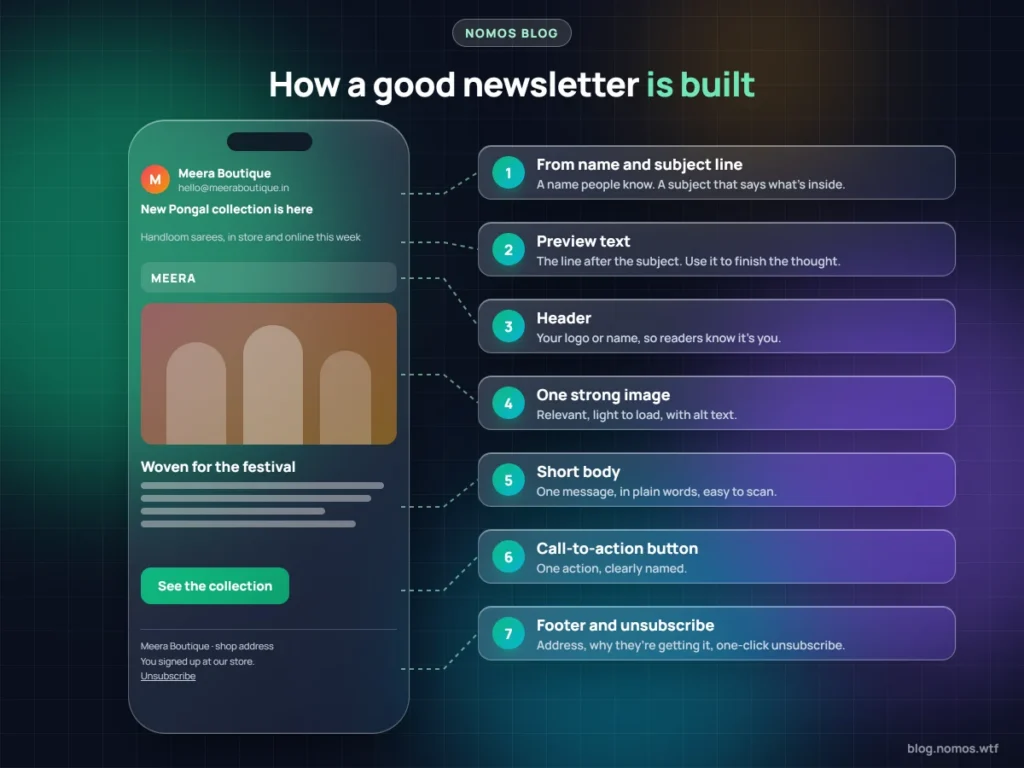
Every good newsletter has the same seven parts. Here they are on an example from a fictional boutique.
Subject line and preview text
Your subject line is a promise about what’s inside. Keep it short and specific. The preview text, which appears next to or below the subject in most inboxes, should add detail rather than repeat it.
| Vague | Specific |
|---|---|
| January newsletter | Our Pongal collection is here, with 40 new handloom sarees |
| Don’t miss out!!! | This week only: filter coffee and snacks combo at ₹99 |
| Updates from our team | Three quick ways to lower your cost per lead |
Content that’s easy to read
Stick to one main message. Write short paragraphs in plain language, as if you were talking to a customer in person. If there’s more to say, link to a page on your website.
Images
Use one relevant image, such as your product, your team or your shop. Add alt text that describes it, because some people read email with images switched off. Keep files small so the email loads quickly on mobile data.
The call-to-action button
Give each email one main action and put it on a button: “See the collection”, “Reserve a table” or “Book a call”. Make it easy to tap on a phone.
The footer and unsubscribe link
End with your business name and address, a short line explaining why the reader is receiving the email, and an unsubscribe link that works in one click.
Before you send
- Send a test to yourself and read it on your phone.
- Click every link and the button.
- Check the “From” name and the subject line for typos.
Step 4: Automate welcome emails and follow-ups
Email automation means emails that send themselves when something happens, such as a new signup. Set them up once and they work in the background.
| Automation | When it sends | Example |
|---|---|---|
| Welcome email | Right after someone subscribes | Thank them, introduce your business, deliver any promised freebie |
| Welcome follow-up | A few days later | Share your best-sellers or most useful guide |
| Thank-you and review request | After a purchase or visit | Ask how it went and link to your review page |
| Reminder | Before an appointment or event | Date, time, address and what to bring |
| Re-engagement | After months without opens | Ask if they still want your emails |
Automations based on a purchase, an appointment or a birthday need your email tool to know when that happened, for example through a tag you add to the contact, so check what your tool supports before you plan them. Start with the welcome email. It’s the one most likely to be read, because the subscriber has just asked to hear from you.
Step 5: Measure your email campaigns
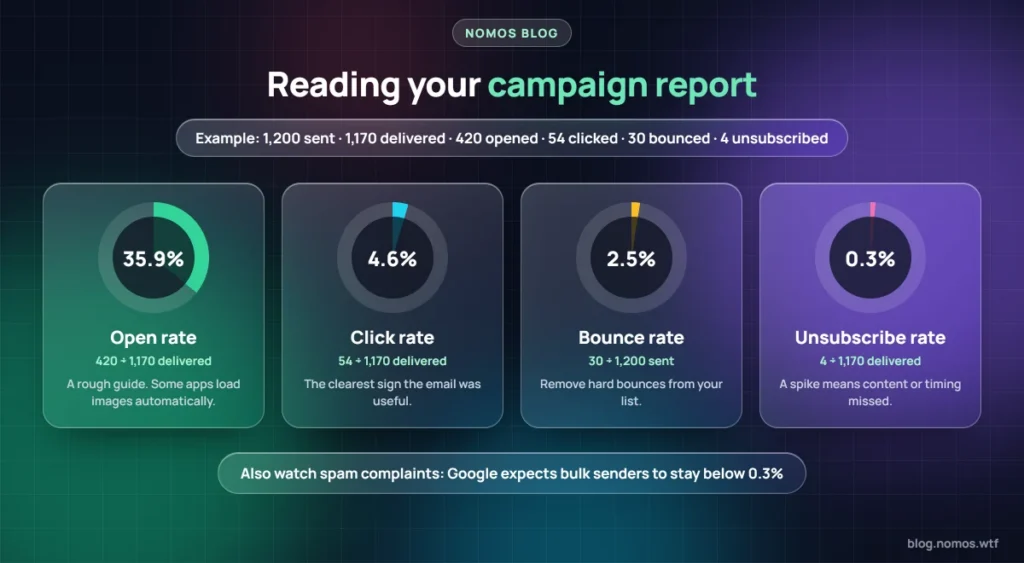
After each send, your campaign report shows opens, clicks, bounces and unsubscribes. These are the numbers that matter, with example figures, along with spam complaints, which mailbox providers track.
Open rate
Opens divided by emails delivered. Treat it as a rough signal, because some mail apps load images automatically, which can register as an open.
Click rate
Clicks divided by emails delivered. It tells you whether your content and button did their job, so it’s usually the most useful number to improve.
Bounces
Emails that couldn’t be delivered. A hard bounce, such as an address that doesn’t exist, should be removed. A soft bounce, such as a full mailbox, is usually temporary.
Unsubscribes
A small number after each campaign is normal. A sudden jump suggests the content, timing or frequency didn’t match what people expected.
Spam complaints
Spam complaints usually don’t appear in your campaign report, because mailbox providers track them. If you send to Gmail addresses, Google Postmaster Tools shows your spam rate. Mailbox providers watch how often recipients mark emails as spam. Google’s email sender guidelines say that senders of about 5,000 or more messages a day to personal Gmail accounts must authenticate with SPF, DKIM and DMARC, offer one-click unsubscribe and keep their spam rate below 0.3%. Following the same habits helps even if you send far less.
Change one thing at a time, such as the subject line, the sending day or the button text, so you can see what made the difference.
Email campaign ideas for shops, agencies, startups and small businesses
| Business | Where subscribers come from | Newsletter idea | Automation idea |
|---|---|---|---|
| Shop or boutique | QR code at the counter, website form | New arrivals and festive collections | Thank-you email after a purchase |
| Café or restaurant | Table card QR code, online orders | Weekly specials and events | Birthday or anniversary offer |
| Agency | Website, events, client referrals | Short case studies and tips | Welcome series for new leads |
| Startup | Product sign-ups | Monthly product updates | Onboarding emails for new users |
| Clinic, salon or tutor | Front desk, booking page | Seasonal advice and offers | Appointment reminders |
Responsible email marketing: a quick checklist
- ✅ Everyone on your list chose to hear from you
- ✅ Your “From” name and address are clearly yours
- ✅ Every marketing email has a one-click unsubscribe link
- ✅ Unsubscribes and hard bounces are removed straight away
- ✅ You send from your own domain, authenticated with SPF, DKIM and DMARC
- ✅ You send as often as you said you would
- ✅ Subscriber data stays in your email tool, not in shared spreadsheets
Avoid sending newsletters from a personal Gmail account or your everyday mailbox. They aren’t designed for bulk email and won’t manage unsubscribes or bounces. For everyday business email, see our guide to getting a professional email address.
What to look for in an email marketing tool in India
Beginners need a tool that is simple and covers the basics well:
- A drag-and-drop editor and ready-made templates
- Contacts, tags and segments, with CSV import
- Automations for welcome emails and follow-ups
- Signup forms for your website
- Reports on opens, clicks, bounces and unsubscribes
- One-click unsubscribe in every email
- Sending from your own domain, with DKIM and DMARC
- Clear limits and pricing, and support in Indian working hours
Nomos Reach: email marketing that comes with Nomos hosting plans
Nomos is the company behind this blog, so this section describes our own product. Our email marketing tool, Nomos Reach, comes with Nomos web hosting and WordPress hosting plans, with no separate subscription. You open it from your Nomos control panel by choosing Email marketing, and you’re signed in automatically.
Nomos Reach includes:
- A drag-and-drop designer that builds newsletters from text, images, buttons and columns
- Templates for offers, updates and announcements
- Contacts, tags and segments, to group people by tag or by what they did
- CSV import that skips duplicates and unsubscribed addresses
- Automations, such as a welcome series, reminders and follow-ups
- Signup forms for your website
- Reports with opens, clicks, bounces and unsubscribes for every campaign
- One-click unsubscribe in every email
- Sending from your own domain, with every email signed with DKIM
Your Nomos Reach plan depends on your hosting plan:
| Hosting plan | Nomos Reach plan | Contacts | Emails a month |
|---|---|---|---|
| Micro, Starter | Reach Free | 500 | 2,500 |
| Growth, WP Starter | Reach Starter | 2,500 | 25,000 |
| WP Growth, WP Business | Reach Growth | 10,000 | 1,20,000 |
To send from your own domain, add it in Nomos Reach and publish the DNS records it shows you, including DKIM and DMARC, wherever your domain’s DNS is managed. If your DNS is managed at Nomos, the records also appear in your control panel. Nomos Reach tells you before you reach a limit; at the monthly email limit, sending pauses until the next month or until you upgrade your hosting plan.
Only import contacts who agreed to hear from you. Sending to bought or scraped lists is against our acceptable use policy.
Need a hosting plan first? Compare web hosting and WordPress hosting, or read which Nomos plan suits you.
Frequently asked questions
What is email marketing for small businesses?
It’s sending useful, planned emails, such as newsletters, offers and reminders, to customers and prospects who agreed to receive them. For a small business, it’s one of the cheapest ways to keep customers coming back.
How often should I send a newsletter?
Once or twice a month is a good start for most small businesses. Pick a rhythm you can keep up, tell subscribers what to expect, and only send extra emails when you have something genuinely useful.
Do I need permission to email customers in India?
Yes. Email only people who agreed to hear from you, and give them an easy way to unsubscribe. India’s Digital Personal Data Protection Act, 2023 requires consent to be free, specific, informed, unconditional and unambiguous. This isn’t legal advice; check with an adviser for your business.
Can I send newsletters from my Gmail account?
It isn’t recommended. Personal and everyday mailboxes aren’t built for bulk sending and don’t manage unsubscribes or bounces. An email marketing tool sending from your own domain is more reliable.
What should my first newsletter say?
Introduce your business, share one thing your customers will find useful or exciting, such as a new product, an offer or a tip, and finish with one clear button.
What is a good click rate?
It varies a lot by industry and audience. Compare each campaign with your own previous ones and aim to improve steadily, rather than chasing a universal benchmark.
Is Nomos Reach included with Nomos hosting?
Yes, with Nomos web hosting and WordPress hosting plans, at no extra cost. Limits depend on your hosting plan, starting at 500 contacts and 2,500 emails a month on Reach Free.
Start small, and keep going
Email marketing for small businesses in India works best when it feels personal and steady. Collect subscribers with permission, send short emails with one clear purpose, let a welcome email do some of the work, and learn from every report. Your first newsletter can go out this week.
If you’re on a Nomos web hosting or WordPress hosting plan, Nomos Reach is ready in your control panel. Questions? Email support@nomos.wtf.
Related guides