
Most people choose a web host by looking at the price and the storage. However, the way a host arranges websites on its servers matters just as much. It affects how fast your pages load, how steady your site feels on a busy day and how far a problem on someone else’s site can spread. That is where website isolation in web hosting comes in.
In this beginner’s guide, you’ll learn what website isolation means and how shared hosting generally works. You’ll also see how a website container keeps one site’s files, CPU and memory apart from another’s. Finally, we explain how Nomos uses isolation, what it does and doesn’t protect against, and who benefits most.
What is website isolation in web hosting?
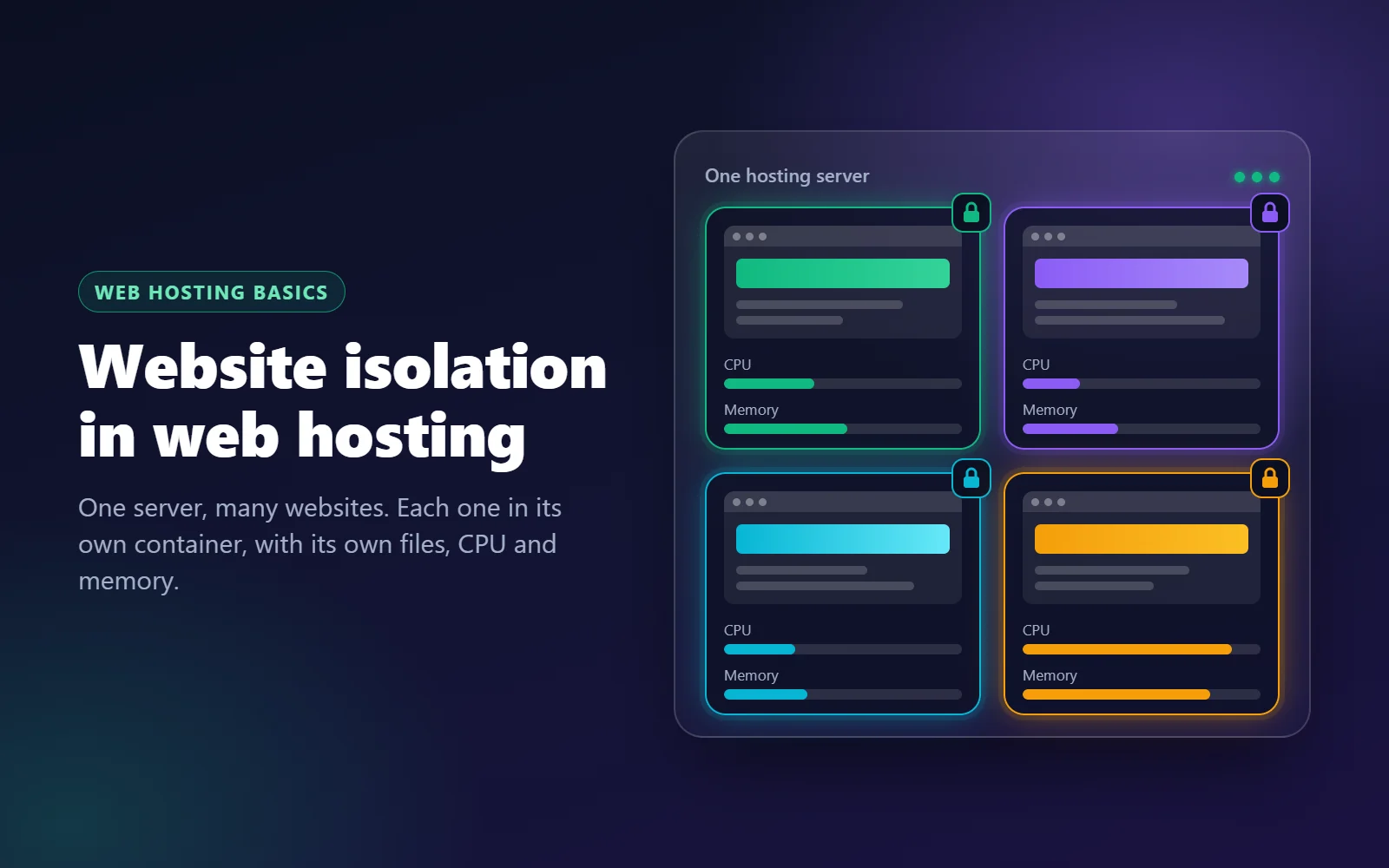
Website isolation means each website on a hosting platform runs in its own separate space. That space has its own files, its own running programs and its own share of server resources. Other websites may sit on the same physical server, but they can’t reach into it.
Put simply, isolation answers one question: if something happens on the website next door, how much of it reaches you? With good isolation, the answer is “very little”.
What is a website container?
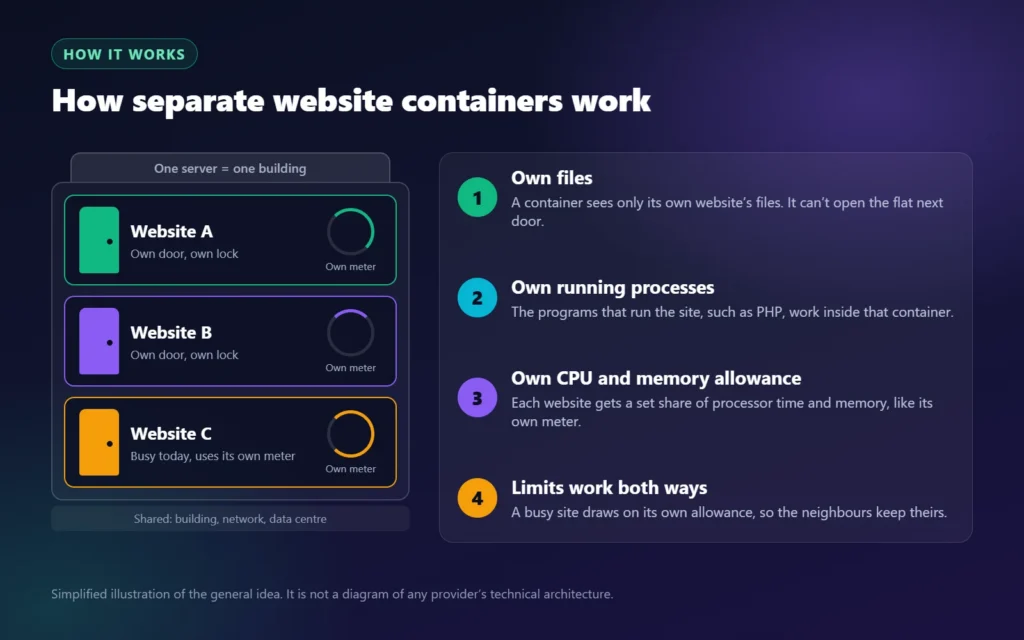
A website container is one common way to create that separate space. You can picture it as a sealed box on a server. Inside the box are your website’s files, the programs that run it (such as PHP) and the limits on how much processor time and memory it may use.
Everything outside the box belongs to someone else. So your website can’t see it, and it can’t see your website. Containers are also lighter than full virtual servers. For example, they don’t need a complete operating system for each website. Instead, many containers run side by side on one server, and the server keeps them apart.
What does an isolated hosting environment mean?
An isolated hosting environment is the result of this setup. Each website lives on its own, even though all of them share the same server, network and data centre.
Think of a block of flats. Every flat shares the building, the lift and the water tank. However, each flat has its own front door, its own lock and its own electricity meter. Your neighbour can’t walk into your kitchen. Likewise, their air conditioner doesn’t run on your meter.
Why separating files and resources matters
Separation solves two everyday problems:
- Files. If websites can’t see each other’s files, a mistake or a hacked plugin on one site has a much harder time reaching another site’s data.
- Resources. If each site has its own CPU and memory allocation, a sudden traffic spike on one site mostly uses up that site’s allowance, not everyone’s.
For example, imagine a bakery website and a coaching centre website on the same server. One evening, the coaching centre publishes exam results and gets thousands of visitors in an hour. With isolation, that rush draws on the coaching centre’s own allocation. As a result, the bakery’s site keeps its resources and is far less likely to slow down.
How traditional shared hosting works
Shared hosting is the most common type of entry-level web hosting. Many websites, often owned by different people, live on one server and share its hardware: processors, memory, storage and network. Because the cost of that server is split between many customers, shared hosting is affordable.
Providers set up shared hosting in different ways, though. Some give each account firm limits, some use containers and some share resources more loosely. So the points below describe general risks of sharing, not how every shared hosting provider works.
Resource contention and website performance
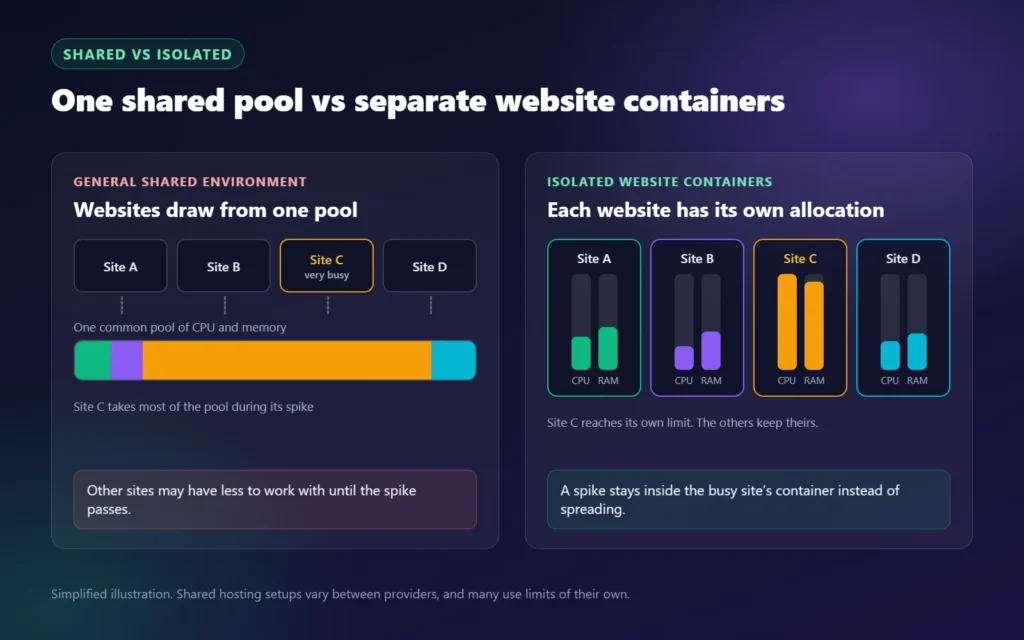
When many websites draw on one common pool of CPU and memory, they compete for it. This is called resource contention. Usually there is enough to go around.
But suppose one website suddenly needs far more than usual, perhaps because of a sale, a viral post or a bot crawling every page. It can then take a large slice of the pool. Other websites on the server may respond more slowly until the spike passes. People often call this the “noisy neighbour” problem.
Shared hosting security and separation
Shared hosting security also depends on separation. If accounts on a server are not kept properly apart, a problem on one website could affect others. Most reputable hosts take steps to prevent this. Still, the level of separation varies, so it’s worth asking any host how it keeps websites apart, not just how much storage you get.
Why isolation and resource allocation matter
In practice, website isolation in web hosting relies on two things working as a pair: isolation and resource allocation. Isolation keeps each website’s files and processes apart. Resource allocation, on the other hand, decides how much CPU and memory each website may use. With both in place, website performance becomes more predictable, because your site’s allowance doesn’t depend on what everyone else is doing.
How website containers work
Let’s look a little closer at what happens inside a website container. The details differ between platforms, so this is a general explanation, not a description of any one host’s setup.
A separate environment for each website
Each website gets its own environment with its own settings. For instance, one website can use one PHP version while another website on the same server uses a different one. Changing a setting in one container doesn’t change the others.
Separate files and processes
A container can only see the files that belong to it. When your website runs PHP code, those processes also run inside your container. So they can read and write your own website’s files, but they can’t browse a neighbour’s folders or interfere with a neighbour’s running programs.
CPU and memory allocation
CPU is the server’s processing power. It handles every page request, database query and plugin task. Memory (RAM), meanwhile, holds whatever your website is working on right now. Together, they are the hosting resources that decide how many visitors your site can serve at once.
On Linux servers, limits for groups of processes are commonly handled by a kernel feature called control groups (cgroups). Container platforms generally use features like this to give each website a set amount of processor time and memory. We mention it only to explain the general idea.
How resource limits keep one busy website from affecting another
A resource limit works in both directions. First, it reserves capacity for your website. Second, it caps how much your website can take. So when one busy website reaches its limit, it slows down within its own container. Meanwhile, the websites next door carry on with their own allocation.
Limits aren’t magic, though. If your own website keeps hitting its limit, it will feel slow. In that case, the fix is to make the site lighter or move to a plan with more resources.
How Nomos uses website isolation
Now for the Nomos-specific part: how Nomos applies website isolation in web hosting. Everything in this section comes from the official Nomos web hosting page, the pricing page and the Nomos fact sheet.
- Each website runs in its own container. Every Nomos web hosting and WordPress hosting plan includes an isolated container for each website.
- Each website has its own CPU and memory allocation. These resources are reserved for that website alone.
- Websites can’t see each other’s files. Nomos lists isolation between websites as part of its security setup.
- You can view resource usage in the Nomos panel. Nomos shows live usage in the control panel.
- Each plan sets its own website resource limits. Every plan lists its storage, files, CPU and memory per website. Nomos enforces these limits so that one busy site can’t slow down another.
- Nomos servers are located in India. Website files, databases, email and backups stay in the country.
Website resource limits on each Nomos plan
Here are the figures from the Nomos pricing page at the time of writing. The pricing page lists CPU and memory for each website.
| Plan | Sites | CPU per site | RAM per site |
|---|---|---|---|
| Micro | 1 | 1 vCPU | 1 GB |
| Starter | 1 | 1 vCPU | 1 GB |
| Growth | 5 | 2 vCPU | 2 GB |
| WP Starter | 1 | 1 vCPU | 1 GB |
| WP Growth | 3 | 2 vCPU | 2 GB |
| WP Business | 10 | 2 vCPU | 3 GB |
So on Growth, for example, each of your five websites gets 2 vCPU and 2 GB of memory, and Nomos reserves them for that website alone. Prices and limits can change, so always check the pricing page for current figures. If you run several sites, our guide to managing multiple websites on one Nomos plan has more detail.
Benefits of website isolation in web hosting for website owners
What does all this mean in practice? Here are the main benefits.
- Better separation between websites. Your files stay in your container, so a problem on another website has a much harder time reaching them.
- More predictable resource allocation. You know how much CPU and memory your site has, so you can plan for busy periods.
- Less impact from a busy neighbour. A traffic spike on another site draws on that site’s allocation. Isolation can’t remove every cause of slowness, such as a heavy plugin on your own site, but it removes a common one.
- Easier management of multiple websites. On Nomos, every site gets its own container, database and temporary address, and its own PHP version and php.ini settings.
- A clearer view of resource usage. You can see live usage in your Nomos control panel. Our website health check guide shows other quick checks.
Does website isolation replace other security measures?
No. Isolation limits how far a problem can spread between websites. However, it doesn’t stop someone from signing in with a stolen password. Nor does it fix an outdated plugin on your own site. Think of it as one layer of protection among several, so keep these habits too:
- SSL certificates. HTTPS encrypts data between your visitors and your website. Every Nomos website plan includes free SSL, issued and renewed automatically. Read more in our guide to free SSL on Nomos.
- Strong passwords. Use long, unique passwords for your hosting account, WordPress admin and email. Also turn on two-step sign-in for your Nomos account.
- Regular backups. Backups let you undo a bad update or a hack. On Nomos, automatic backups run daily on Growth and the WordPress plans and weekly on Micro and Starter. See how backups work on Nomos.
- WordPress updates. Keep WordPress core, themes and plugins up to date. The official WordPress hardening guide covers more steps.
- Malware scanning. On Nomos, WordPress sites are scanned every week, and you can run a scan on any website from the control panel.
Who can benefit from website isolation in web hosting?
Almost any website owner benefits from isolation. Still, some people notice the difference more than others.
Small businesses
A small business website is often the first place customers check. Isolation helps keep it steady when a neighbouring site has a busy day, so your opening hours and contact page stay easy to reach.
Agencies managing multiple websites
Agencies often host many client sites together. With each site in its own container, one client’s plugin problem or traffic spike stays with that client. In addition, each site keeps its own settings and resources.
WordPress website owners
WordPress sites run PHP and a database on every uncached page view, so they need steady CPU and memory. A dedicated allocation gives them that. For more tips, read our guide to choosing WordPress hosting in India.
Developers
Developers can run different sites with different needs side by side. On Nomos, for example, each website can use PHP 8.3 or 8.4 with its own php.ini settings, and web hosting plans also support Node.js apps.
Online store owners
Online stores have busy moments, such as a festival sale. Isolation means those moments use the store’s own resources. It also means a quiet neighbour’s problem is less likely to affect checkout. Our WooCommerce hosting guide covers the rest of the setup.
Why consider Nomos for secure web hosting in India?
If you are looking for secure web hosting in India, here is what Nomos includes with its website plans:
- A separate container for each website
- Dedicated CPU and memory for each website
- Servers in India, with files, databases, email and backups kept in the country
- Free SSL on every domain, renewed automatically
- Automatic backups according to plan: weekly on Micro and Starter, daily on Growth and every WordPress plan
- Business email on your own domain, included with every website plan
- Live usage in the control panel
Web hosting plans start at ₹39 a month on a 36-month term, before tax, and renew at the same price. Compare the details on the Nomos web hosting page and the Nomos pricing page. Not sure which plan fits? Read which Nomos plan is right for your website.
Frequently asked questions about website isolation in web hosting
Is website isolation the same as a VPS?
No. A Nomos VPS is a Linux virtual server with root access. On Nomos web hosting and WordPress hosting, each website runs in its own container instead. Our VPS hosting guide explains when a VPS makes sense.
Does website isolation make my website faster?
Not on its own. It makes website performance more predictable, because neighbours can’t use your share. Speed still depends on your site’s theme, plugins and caching. See how to make WordPress faster on Nomos.
Can other websites on Nomos see my files?
No. Nomos states that websites can’t see each other’s files.
Do websites on the same Nomos plan share CPU and memory?
No. Nomos lists CPU and memory for each website and reserves them for that website alone.
Is a website container the same as a separate server?
No. Containers share the physical server with other containers. Each one is still kept apart, with its own files and its own resource limits.
Does every Nomos web hosting plan include website isolation?
Yes. Every Nomos web hosting and WordPress hosting plan lists its own isolated container per website. The amount of CPU and memory differs by plan.
Conclusion: why website isolation matters
Website isolation in web hosting keeps each website in its own space, with its own files and its own CPU and memory. As a result, a busy or broken neighbour has much less effect on your site, and your hosting resources are easier to understand and plan for. It isn’t a complete security plan on its own, so pair it with SSL, strong passwords, backups, updates and malware scanning.
If that sounds like the setup you want, explore Nomos web hosting. Every website gets its own container on servers in India, and you can compare every plan’s limits before you choose.